Certificates and PKI
X.509 certificates and public key infrastructure (PKI) let systems authenticate public keys. They are used by TLS, which underlies HTTPS, as well as many other security protocols.
Man-in-the-Middle Attacks
A man-in-the-middle (MITM) attack occurs when an attacker places itself between two parties and impersonates each party to the other. The attacker can read, modify, delay, or relay their traffic.
The following sequence diagram shows a key-substitution attack when the client has no authenticated way to obtain the server’s public key:
sequenceDiagram
    participant Client
    participant Attacker
    participant Server

    Client->>Attacker: Connect to server
    Attacker->>Server: Connect as client
    Server-->>Attacker: Present server's public key
    Attacker-->>Client: Present attacker's public key as server's key
    Client->>Attacker: Encrypted request
    Attacker->>Attacker: Decrypt, inspect, or modify request
    Attacker->>Server: Re-encrypt and forward request
    Server-->>Attacker: Encrypted response
    Attacker->>Attacker: Decrypt, inspect, or modify response
    Attacker-->>Client: Re-encrypt and forward response
The problem is that the client has no way to know whether the public key it obtained actually belongs to the server. Encryption then protects the connection to the attacker, not to the intended server.
Certificates and PKI solve this by binding a server’s identity to its public key through a trusted signature. The client can then verify that the key belongs to the hostname it intended to reach.
Certificates
An X.509 certificate is a signed statement that binds a subject identity to a public key and constrains how that key may be used.
A certificate is data, not necessarily a file. It can be stored in a database, sent over a network protocol, or saved to disk. A filename such as server.crt or certificate.pem is only a convention; the certificate’s structure and encoding determine what it is.
Contents
The following tree view shows the complete outer certificate structure. The Extensions node can contain any number of defined or private extensions; its children show common examples rather than an exhaustive list.
treeView-beta
    Certificate/
        tbsCertificate/
            version
            serial number
            signature algorithm
            issuer
            validity/
                not before
                not after
            subject
            subject public key info/
                public key algorithm
                subject public key
            issuer unique identifier (optional)
            subject unique identifier (optional)
            extensions (optional)/
                ...
        signature algorithm
        certificate signature
The most important certificate fields answer a small set of questions:
| Question | Certificate Field |
|---|---|
| Who is this about? | Subject and Subject Alternative Name (SAN) Extension |
| What public key belongs to it? | Subject Public Key Info |
| Who makes the claim? | Issuer |
| When is the claim valid? | Validity (Not Before and Not After) |
| How is the claim protected? | Certificate signature |
The serial number identifies a certificate within its issuer’s namespace and is important for certificate management and revocation. Modern certificates are normally X.509 version 3, where extensions carry much of the identity and constraint information.
Distinguished Names
The Subject and Issuer fields are usually distinguished names (DNs). A DN is an ordered set of named attributes that identifies an entity within a naming context. It isn’t a globally unique or trustworthy identifier by itself.
The following tree view shows an example Subject DN:
treeView-beta
    Subject DN/
        C = US
        O = Example Corp
        OU = Engineering
        CN = Alice
Some common DN attributes include:
CNis the common name.Ois the organization.OUis the organizational unit.Cis the country.STis the state or province.Lis the locality.
Anyone can create a certificate whose Subject says CN=Google; the name gains meaning only when a trusted issuer has signed it. For TLS, hostname verification uses the SAN extension rather than the historical Subject Common Name (CN).
Extensions
X.509 defines a fixed set of core certificate fields. However, certificates are used for many different purposes, and the core fields aren’t sufficient to express every identity, restriction, or capability that a certificate may need.
X.509 version 3 therefore introduced extensions. An extension is a typed piece of additional information attached to a certificate. Extensions can provide additional identities, constrain how a certificate or its public key may be used, identify keys, and provide information needed by certificate validation and revocation mechanisms.
A certificate may contain multiple extensions. Each extension contains three components:
- An object identifier (OID) identifies the type of extension. OIDs must be globally unique.
- A criticality flag indicates whether a verifier must understand and process the extension.
- A value contains the extension-specific data.
An OID doesn’t merely label an extension instance; it identifies the extension’s type and therefore determines how its value is interpreted. Extension OIDs must be unique within a certificate, and custom extensions should not collide with existing common OIDs.
The interpretation of value depends on the OID. For example, the OID for Subject Alternative Name tells the verifier that the value should be interpreted as a collection of identities such as DNS names or IP addresses.
If an extension is marked critical, a verifier that doesn’t recognize or cannot process that extension must reject the certificate. Otherwise, it could accept a certificate without enforcing a restriction that the issuer intended to be mandatory.
An unrecognized non-critical extension may be ignored.
Subject Alternative Name (SAN)
The Subject Alternative Name (SAN) extension associates additional identities with the certificate’s subject. In TLS server certificates, it is primarily used to specify the DNS names and IP addresses for which the certificate is valid.
The following example shows a SAN extension for a certificate valid for several DNS names:
treeView-beta
    Extension/
        OID = 2.5.29.17
        Critical = false
        Value/
            DNS = example.com
            DNS = www.example.com
            DNS = api.example.com
This allows one certificate to work for multiple DNS names and IP addresses, instead of having to create one certificate for each. As a result, modern TLS hostname verification uses SAN rather than the historical practice of interpreting the Subject’s Common Name (CN) as the hostname.
Basic Constraints
The Basic Constraints extension specifies whether a certificate may act as a Certificate Authority.
The following example shows Basic Constraints for an end-entity certificate:
treeView-beta
    Basic Constraints/
        OID = 2.5.29.19
        Critical = true
        Value/
            CA = false
By contrast, a CA certificate can set CA to true and include a path length constraint:
treeView-beta
    Basic Constraints/
        OID = 2.5.29.19
        Critical = true
        Value/
            CA = true
            Path Length Constraint = 3
A CA certificate may also contain a path length constraint, which limits how many additional CA certificates may appear beneath it in a certification path.
Basic Constraints therefore prevents an ordinary end-entity certificate from being treated as a CA merely because its public key can technically produce digital signatures.
Key Usage
The Key Usage extension restricts the cryptographic operations for which the certificate’s public key may be used.
The following example shows Key Usage for a CA certificate:
treeView-beta
    Key Usage/
        OID = 2.5.29.15
        Critical = true
        Value/
            Certificate Sign = true
            CRL Sign = true
Extended Key Usage (EKU)
The Extended Key Usage (EKU) extension further restricts the purposes for which the certificate may be used at the application or protocol level.
The following example shows Extended Key Usage for a certificate permitted for both TLS server and client authentication:
treeView-beta
    Extended Key Usage/
        OID = 2.5.29.37
        Critical = false
        Value/
            TLS Web Server Authentication = 1.3.6.1.5.5.7.3.1
            TLS Web Client Authentication = 1.3.6.1.5.5.7.3.2
The EKU’s value is itself a list of OIDs, where each OID identifies an application purpose.
Subject Key Identifier (SKI)
The Subject Key Identifier (SKI) extension provides an identifier for the public key contained in the certificate. It is commonly derived from the public key, such as a hash of the public key.
The identifier is useful for distinguishing between different keys belonging to the same subject, such as when a CA rotates its key.
Authority Key Identifier (AKI)
The Authority Key Identifier (AKI) extension helps identify the issuer key that was used to sign a certificate.
A common relationship is:
Child certificate
    Issuer: Example CA
    AKI: A7:31:9F:...

Issuer certificate
    Subject: Example CA
    SKI: A7:31:9F:...

Issuer certificate with different key
    Subject: Example CA
    SKI: B4:82:6C:...
The Issuer DN identifies the issuing authority, while AKI can help distinguish which of that authority’s keys was used.
Encoding
Abstract Syntax Notation One (ASN.1) is a notation for defining structured data types such as X.509 certificates. It defines the certificate’s fields and their nesting, but not the bytes used to store a particular certificate.
Distinguished Encoding Rules (DER) is a deterministic binary encoding of ASN.1 data. DER certificate data isn’t human-readable.
Privacy-Enhanced Mail (PEM) is a textual representation of DER data: it Base64-encodes the DER bytes and wraps them in a labeled block:
-----BEGIN CERTIFICATE-----
MIIDXTCCAkWgAwIBAgIJAK...
-----END CERTIFICATE-----
PEM isn’t the certificate format itself and doesn’t imply that the contents are a certificate. The same container convention can represent a private key or public key:
-----BEGIN PRIVATE KEY-----
...
-----END PRIVATE KEY-----
Certificate Authorities
A certificate authority (CA) is an entity that issues certificates by signing them with a CA private key. The corresponding public key is distributed in a CA certificate, allowing relying parties to verify certificates issued by that CA.
A CA certificate is distinguished from an ordinary end-entity certificate by extensions that authorize it to issue certificates. In particular, it has Basic Constraints with CA:TRUE and normally permits certificate signing through the keyCertSign Key Usage.
An end-entity certificate, by contrast, represents an entity such as a server, user, or device and isn’t permitted to issue certificates.
Root and Intermediate CAs
CAs can be arranged hierarchically.
An intermediate CA has a CA certificate issued by another CA. A relying party can therefore establish trust in the intermediate’s public key by verifying its certificate using its issuer’s public key.
Eventually this hierarchy must terminate somewhere. A root CA sits at this trust boundary. Rather than deriving trust in the root from another CA, a relying party is explicitly configured to trust the root’s public key.
Trust Anchors and Trust Stores
A trust anchor is public-key and identity information that a relying party accepts as trusted without deriving that trust from another certificate in the certification path.
Operating systems, browsers, applications, and other relying parties maintain collections of configured trust anchors called trust stores. Trust anchors are commonly represented using root CA certificates.
A certificate chain is trusted only if the relying party can construct and validate a certification path that terminates at one of its trust anchors.
Self-Signed and Self-Issued Root Certificates
Root CA certificates are commonly self-signed: the certificate is signed using the private key corresponding to the public key contained in that same certificate.
The self-signature doesn’t establish trust in the root. Anyone can generate a key pair and create a self-signed certificate.
A certificate is self-issued when its Subject DN and Issuer DN match.
The following diagram shows the difference between self-signed and self-issued certificates:
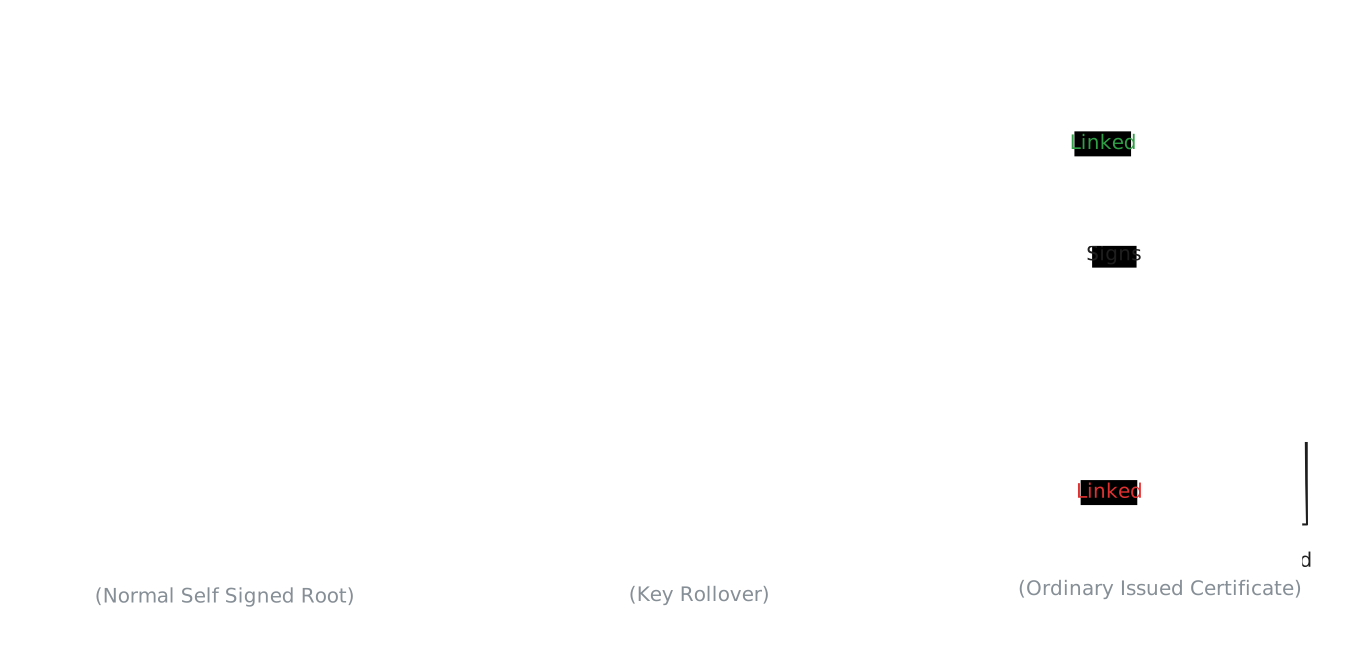
A typical root certificate is both self-issued and self-signed. However, a certificate can be self-issued without being self-signed. This occurs, for example, during CA key rollover.
Certification Paths and Validation
A certification path is an ordered sequence of certificates through which a relying party can establish trust in an end-entity certificate. It begins with the certificate being validated and follows issuing CAs toward a configured trust anchor.
A certificate doesn’t necessarily have one unique path. Depending on the available certificates, cross-signing, key rollover, and the relying party’s trust anchors, several candidate paths may exist.
The following diagram shows how the same end-entity certificate can have several candidate paths to different trust anchors:

Path Building
Path building is the process of finding candidate certification paths from the end-entity certificate to a trust anchor.
Given an end-entity certificate, available CA certificates, and a set of trust anchors, a path builder:
- Starts with the end-entity certificate.
- Reads its Issuer DN to identify the issuing authority.
- Finds candidate issuer certificates whose Subject DN corresponds to that Issuer DN.
- Uses information such as AKI and SKI, when present, to distinguish between multiple candidate issuer keys.
- Selects a candidate issuer certificate and continues the same process from that certificate.
- Repeats until it reaches a configured trust anchor or can no longer construct the path.
- Produces one or more candidate certification paths.
Issuer/Subject and AKI/SKI relationships help find candidate issuers; they don’t prove that one certificate issued another. Cryptographic verification is performed during path validation.
Path Validation
Path validation determines whether a candidate certification path is acceptable for the intended purpose.
Given a candidate certification path (produced during path building step), a path validator:
- Starts with the end-entity certificate and verifies its signature using the public key in its issuer certificate.
- Continues upward, verifying each certificate’s signature using the public key in the next certificate in the path.
- Confirms that the path terminates at a configured trust anchor.
- Checks that the relevant certificates are within their validity periods.
- Checks that every certificate acting as a CA has Basic Constraints permitting CA use and that any path length constraints are satisfied.
- Checks that Key Usage and Extended Key Usage permit the required operations and purpose.
- Processes certificate extensions and rejects the path if a required critical extension isn’t understood or its constraints aren’t satisfied.
- Applies any additional checks required by the application. For TLS server authentication, this includes verifying that the requested hostname matches an identity in the leaf certificate’s SAN.
- Accepts the path only if all required checks succeed.
If a candidate path fails, the relying party may attempt another path produced during path building.
In theory, path building and path validation are separate steps. In practice, real implementations often perform some checks while building so they can prune impossible paths early.
Multiple Certificates for the Same Key
A key pair and a certificate don’t have a one-to-one relationship. A key pair exists independently of certificates, and the same public key may appear in multiple different certificates.
Likewise, a private key may sign many different certificates.
Suppose CA X controls the key pair . CA X may have multiple certificates containing . These are different certificate objects even though they contain the same public key. They may differ in their issuer, serial number, validity period, extensions, and signature.
At the same time, CA X can use to issue any number of child certificates. Those child certificates don’t contain as their subject public key. Each contains the public key belonging to its own subject, while its certificate signature was produced using .
Cross-Signing
Cross-signing occurs when one CA issues a certificate containing another CA’s public key. The certified CA still controls the corresponding private key, but its public key can now appear in certificates with different issuers and signatures:
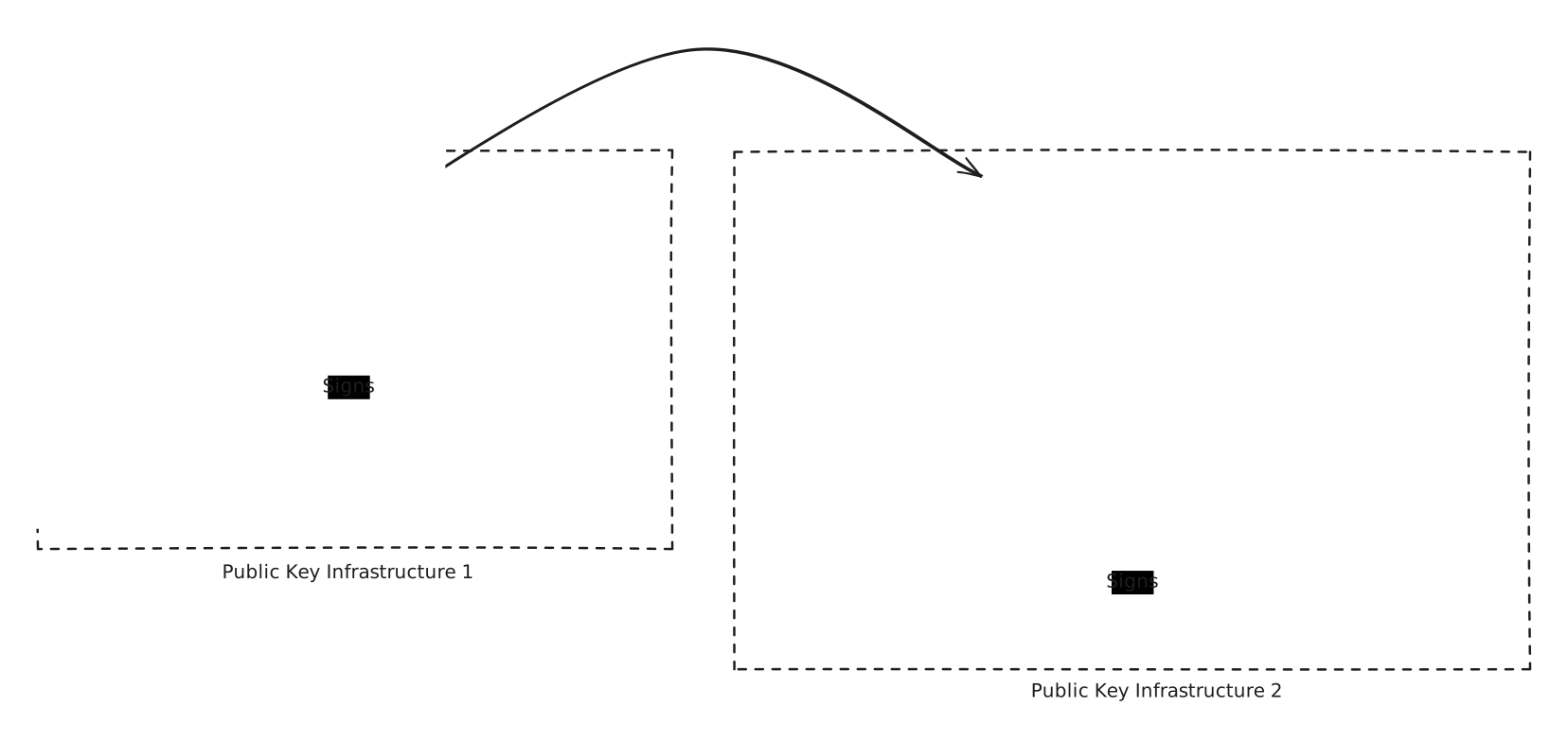
This mechanism allows a relying party that trusts one CA but not another to validate a certificate issued under the untrusted CA through the trusted CA’s certificate:

Cross-signing doesn’t automatically make every certificate in two PKIs mutually trusted. It only creates additional possible certification paths; the relying party must still build and validate a complete path to one of its own trust anchors.
CA Key Rollover
A CA performs key rollover when it replaces an old signing key pair with a new one.
The CA creates a new key pair and a new self-signed certificate containing its new public key. It can then begin issuing certificates with its new private key. However, relying parties may not all transition to the new trust anchor at the same time: some may trust only the old key, while others trust only the new key.
The CA can bridge the two key generations with transition certificates:
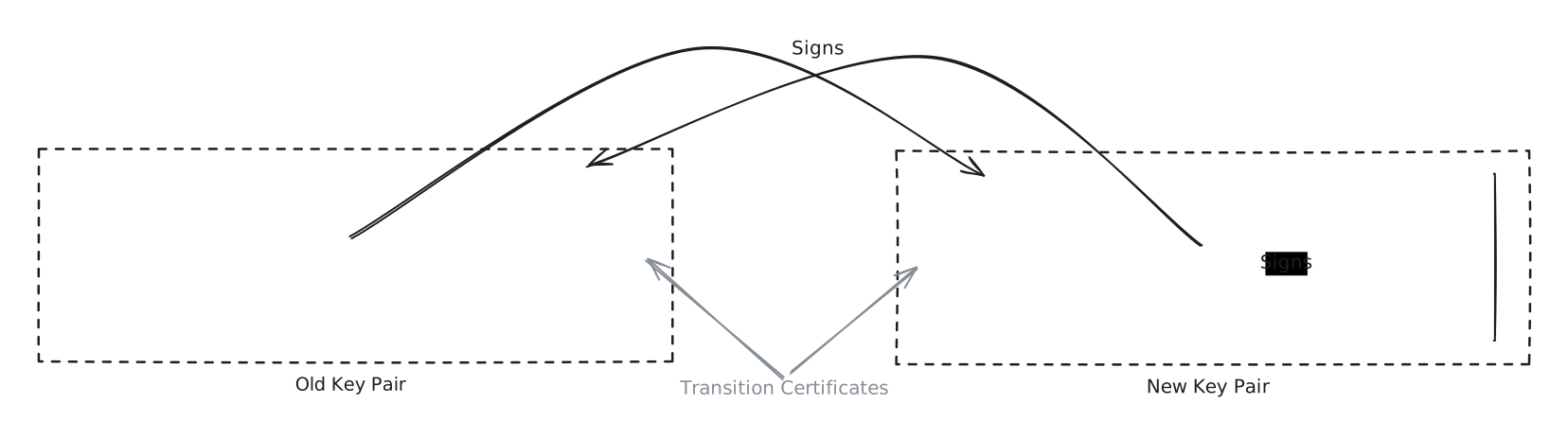
Key rollover therefore uses the same underlying property as cross-signing: a CA public key may appear in more than one certificate, allowing different certificates to provide different certification paths for the same key.
The difference is that cross-signing typically connects different CA identities or trust hierarchies, while key rollover can connect different key generations belonging to the same CA identity.
Certificate Issuance
Certificate issuance is the process by which a certificate authority (CA) validates a certificate request and issues a signed certificate binding an identity to a public key.
At a high level:
- The applicant generates a public/private key pair.
- The applicant creates a Certificate Signing Request (CSR) containing the public key and information about the certificate being requested.
- The applicant sends the CSR to a CA.
- The CA validates the identity or control claims associated with the request.
- If validation succeeds, the CA constructs an X.509 certificate containing the applicant’s public key, approved identity information, validity period, extensions, and other fields.
- The CA signs the certificate’s
tbsCertificateusing its private key. - The CA returns the issued certificate to the applicant.
Certificate Signing Requests
A Certificate Signing Request (CSR) is a signed data structure used to request a certificate from a CA. The most commonly used CSR format is defined by PKCS #10.
A CSR contains the public key that the applicant wants certified, information identifying the applicant, and optionally requested certificate attributes or extensions.
The applicant then signs it with the private key corresponding to the contained public key, allowing the CA to verify proof of possession. However, this signature doesn’t yet prove that the applicant is entitled to the identity being requested.
For example, anyone could generate a key pair and create a CSR requesting:
SAN:
    DNS = google.com
The signature would prove that the requester owns the private key associated with the CSR, but it says nothing about whether they control google.com. That is why certificate issuance requires a separate identity-validation step.
A CSR is commonly encoded using DER and represented textually using PEM:
-----BEGIN CERTIFICATE REQUEST-----
MIICXTCCAkWgAwIBAgIJAK...
-----END CERTIFICATE REQUEST-----
As with certificates, the Base64 text represents DER-encoded structured data rather than a human-readable form of the individual fields.
Identity Validation
Before signing a certificate, the CA must validate the claims that it is going to certify. The exact validation depends on the certificate type and the CA’s policies; for publicly trusted HTTPS certificates, the most important claim is normally control of the requested DNS name.
Domain Validation
A Domain Validation (DV) certificate requires the CA to verify control of the requested domain name. The CA may require the applicant to demonstrate control through mechanisms such as:
- Place a CA-provided value at a particular HTTP location on the domain.
- Create a particular DNS record.
- Use another CA-approved domain-control validation mechanism.
Domain validation proves control of the domain, not the real-world identity of the person or organization controlling it.
Organization and Extended Validation
Other certificate-validation models verify additional identity information. Organization Validation (OV) certificates include validation of information about the organization requesting the certificate in addition to domain control, while Extended Validation (EV) applies a more prescriptive set of identity-validation requirements.
ACME and Let’s Encrypt
Manually generating requests, proving domain control, obtaining certificates, installing them, and repeating the process whenever certificates expire would make certificate management operationally expensive. The Automatic Certificate Management Environment (ACME) protocol automates much of this lifecycle.
An ACME client can interact with an ACME-compatible CA to automate certificate issuance:
- Create or use an ACME account.
- Submit an order specifying the identifiers, such as DNS names, to include in the certificate.
- Receive authorization requirements and challenges from the CA.
- Complete the required challenges to prove control of those identifiers.
- Notify the CA that the challenges are ready, and wait for the CA to validate them.
- Finalize the order by submitting a Certificate Signing Request (CSR).
- Wait for issuance and download the issued certificate.
- Repeat the issuance process as necessary to renew the certificate before it expires.
Let’s Encrypt is a free, automated, publicly trusted certificate authority operated by the Internet Security Research Group (ISRG). ACME was originally developed for Let’s Encrypt and was later standardized by the IETF.
Certificate Revocation
Certificates normally remain valid until their Not After time. Sometimes, however, a certificate needs to stop being trusted before it expires, for example because:
- The corresponding private key may have been compromised.
- The certificate may have been incorrectly issued.
- The subject may no longer be authorized to use the certificate.
- Information certified by the CA may no longer be valid.
In those cases, the issuing CA can revoke the certificate.
Certificate Revocation Lists
A Certificate Revocation List (CRL) is a signed list published by a CA containing certificates that the CA has revoked. It identifies certificates primarily by serial number, and its signature lets relying parties verify that the revocation information came from the CA and hasn’t been modified.
A certificate may contain a CRL Distribution Points extension identifying locations from which the relevant CRL can be obtained.
Normally, the CA automatically adds the CRL distribution point extension to a certificate before signing it.
A relying party can therefore:
- Determine which CA issued the certificate.
- Obtain the CA’s applicable CRL.
- Verify the CRL’s signature and freshness.
- Check whether the certificate’s serial number appears in the list.
- Treat a listed certificate as revoked.
CRLs can be cached locally and reused for multiple certificate checks until they need to be refreshed.
Their disadvantage is that a relying party may need to download a potentially large list even when it wants the status of only one certificate, creating bandwidth, storage, and freshness trade-offs.
Online Certificate Status Protocol
The Online Certificate Status Protocol (OCSP) provides a way to query the revocation status of an individual certificate without downloading an entire CRL. The relying party sends a request to an OCSP responder, usually operated by or on behalf of the certificate issuer, and receives a signed response reporting good, revoked, or unknown.
OCSP reduces the revocation data a client needs to download, but direct checking adds a network request to certificate validation. The client may need to resolve and connect to the responder, making it an availability dependency when the responder is unavailable. Direct queries can also reveal browsing information, because a responder can infer that a user is connecting to a service using the queried certificate.
Fail-Soft and Fail-Hard
Online revocation checking creates an availability-versus-security problem when revocation information cannot be obtained.
With a fail-hard policy, a client rejects the certificate when it can’t determine its status. This provides stronger revocation enforcement, but an unavailable responder can make otherwise legitimate services inaccessible and may enable denial of service.
With a fail-soft policy, a client continues when it can’t determine the certificate’s revocation status. This preserves availability, but weakens revocation because an attacker using a revoked certificate may block the revocation request and cause the client to proceed.
OCSP Stapling
OCSP stapling avoids requiring every client to contact the OCSP responder directly. Instead, the server holding the certificate periodically queries the responder for the status of its own certificate, caches the signed response, and staples it to the TLS handshake when clients connect.
The following sequence diagram shows the server obtaining a status response before any client connection, then stapling that response during a later TLS handshake:
sequenceDiagram
    participant Server
    participant Responder as OCSP Responder
    participant Client

    Note over Server,Responder: Periodic refresh
    Server->>Responder: Request status for server certificate
    Responder-->>Server: Signed OCSP response
    Server->>Server: Cache response until refresh is required

    Note over Client,Server: TLS handshake
    Client->>Server: Start TLS handshake
    Server-->>Client: Certificate and stapled OCSP response
    Client->>Client: Verify certificate and OCSP response
The server cannot simply forge a good status because the OCSP response is signed by an authority whose signature the client can verify. Stapling therefore has several advantages:
- The client doesn’t need a separate connection to the OCSP responder.
- Certificate validation avoids the additional network latency of a direct OCSP request.
- The CA’s OCSP responder receives fewer requests.
- The client doesn’t directly reveal each certificate it is checking to the responder.
The stapled response has a limited validity period, so the server must periodically obtain a fresh response.
